November 8, 2026
Pixel-Exact AI Retouching vs Photoshop, Nano Banana, FLUX
The short answer
AI can now take over one part of a retoucher's day: the isolated, local fix. Removing a guest, changing a jacket, cleaning up a detail. SpotEdit does that from one sentence, works at your photo's native resolution up to 49 MP, and leaves every pixel outside the edit identical to the file you uploaded.
It does not replace Photoshop as a whole. Layered composites, colour grading, 16-bit work and batch actions still belong there. The practical change is the order of work: do the spot fixes by description, then bring the file into Photoshop only if it still needs something Photoshop is uniquely good at.
Why does "the background did not change" matter?
Because a delivered photo has already been approved. Skin, grain, sharpening and the grade are the photographer's work, and a client notices when they drift.
General AI image models take the whole image, generate a new one and return that. Even where the picture looks the same, the pixels are new. Researchers have documented the effect: a study of Stable Diffusion inpainting found distortion even in regions that were not being edited, worst on fine structure such as text, and a NeurIPS 2026 paper documents quality degrading over repeated edits.
SpotEdit is built the other way round. The editor reports the area it edited, and everything outside that area comes back as it was. Since each edit leaves the rest alone, a second or third edit adds no drift outside the areas you changed.
Do Nano Banana and FLUX keep the background?
Not pixel for pixel. Google's Nano Banana and Black Forest Labs' FLUX are excellent image models, but they resample the image they are given, and that shows in independent tests.
Agent Banana, a 2026 research paper, tested editors on 96 three-turn sessions with 4K images and measured the background separately from the edit. It describes end-to-end models that "resample the entire image", and one of its figures shows Nano Banana Pro distorting original details because it edits globally.
| Nano Banana Pro | FLUX.1 Kontext [Pro] | SpotEdit | |
|---|---|---|---|
| Background PSNR in that test (higher is better) | 26.62 dB | 25.98 dB | Not in that test |
| Background SSIM in that test (1.0 is identical) | 0.72 | 0.74 | Not in that test |
| Pixels outside the edit | Resampled | Resampled | Identical to the upload |
| Output size | Named tiers up to 4K | A fixed 1 MP, in multiples of 32 px | Native: your exact size, up to 49 MP |
A perfect copy has infinite PSNR and an SSIM of 1.0, so those scores mean the background really did change. The paper's own method, designed for this problem, reached 28.40 dB and 0.84. FLUX.2 raises the ceiling to 4 MP, and resizes larger inputs automatically.
Size matters as much as drift. A 30 MP wedding frame cannot come back from a 1 MP model at its original size, and any later enlargement invents detail. SpotEdit does not change the resolution at any step: nothing is scaled down, scaled up or rebuilt from a smaller version, including inside the edit.
To be fair to these models: we have not run them on the same photos ourselves, and the paper's test is not a test of SpotEdit. They are also better at things SpotEdit does not try to do, such as restyling an image or changing a whole scene. In the same table Nano Banana Pro scored 0.911 for following the instruction, ahead of Kontext's 0.845. The pixel check further down works on any editor's output of the same size, so you can compare them on your own files.
How do the options compare?
| Manual Photoshop | Photoshop Generative Fill | Nano Banana, FLUX | SpotEdit | |
|---|---|---|---|---|
| What you do | Select, mask, clone, heal, blend | Make a selection, write a prompt | Write a prompt | Write a prompt; painting an area is optional |
| Pixels outside the edit | Unchanged | Unchanged outside the selection | Resampled, so they can drift | Identical to the upload |
| Size of the result | Your document | Your document; each generation is reported at 1K to 2K | 1 MP to 4K, depending on the model | Native, up to 49 MP |
| Layers and bit depth | Full layers, up to 32-bit | Generative layer in your document | Flattened image | Flattened 8-bit PNG |
| Time for a spot fix | Depends on the fix and your skill | Seconds to generate, plus the selection | Varies by service | 40 to 70 seconds |
| Cost | Photoshop subscription | Subscription plus generative credits | Varies | 40 credits up to 12 MP, 50 credits up to 24 MP, 60 credits up to 49 MP |
Generative Fill deserves a fair reading, because it is the real competitor here. It also leaves everything outside your selection alone. Its limit shows on large areas: an Adobe staff reply in July 2025 put it at 1024 × 1024 per generation, and PhotoshopCAFE reported in February 2026 that a newer model reaches 2048 × 2048, with larger selections stretched to fit. Adobe offers Enhance Detail and Generative Upscale to compensate. SpotEdit has no such step, because it works at the native resolution of your file. Adobe's single-app plan was listed at US$22.99 a month, billed annually, with 25 generative credits a month when this was written. Check Adobe's pages for current figures.
What work does it take off your hands?
A manual removal is a chain of small jobs: select the subject, feather the mask, rebuild what was behind it, match the grain, check the edge. With SpotEdit that chain becomes one sentence and a check at 100%. These are real edits, each from a single request, each returned at its original size:
| Job | The request | Original | Price |
|---|---|---|---|
| Clear the view at a wedding | Remove the blurry guests in the foreground on the left and right edges, so the bride and groom are clearly visible. | 6720 × 4480 · 30 MP | 60 credits |
| Remove someone from a group photo | Remove the man on the right side of the photo, fill in the background naturally. | 3936 × 2624 · 10 MP | 40 credits |
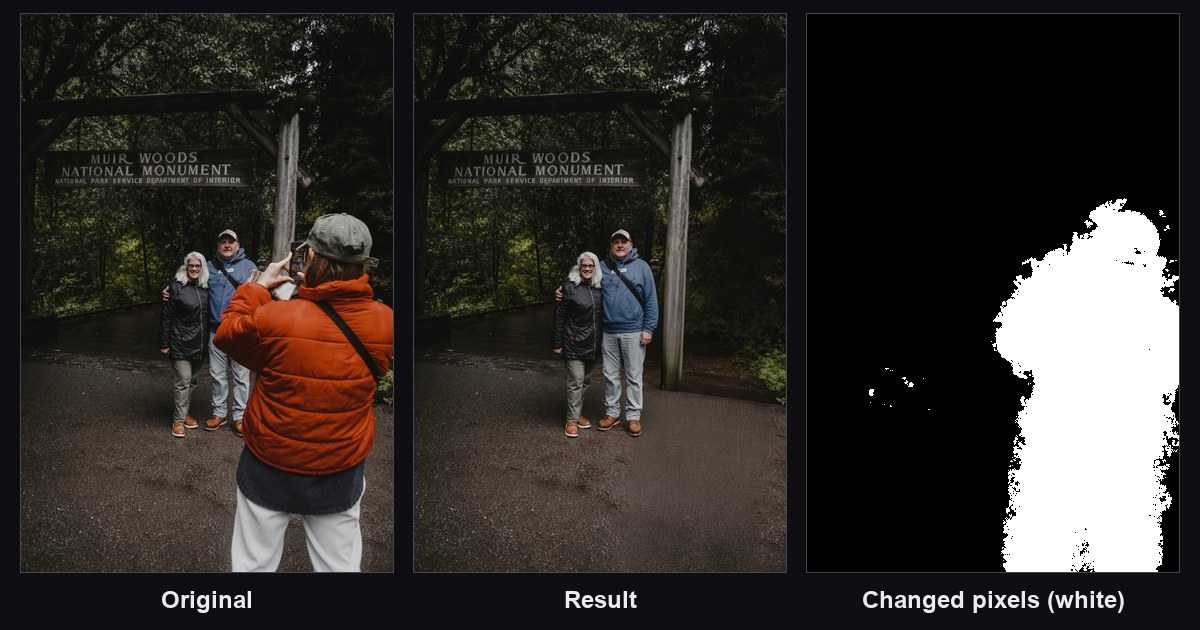
| Remove a photobomber | Remove the man in the orange jacket taking a photo in the foreground. | 4000 × 6000 · 24 MP | 50 credits |
| Casual photo to headshot | Change his white T-shirt to a navy blue suit jacket with a white dress shirt. | 3569 × 5354 · 19 MP | 50 credits |
| Try a new look | Change the denim jacket to a black leather jacket, keep the white hoodie. | 3456 × 5184 · 18 MP | 50 credits |
| Remove braces | Remove the braces from her teeth, natural clean white teeth. | 3456 × 5184 · 18 MP · close-up | 50 credits |
See them with a before and after slider on the SpotEdit page.
Where this pays off most:
How can you prove no other pixel changed?
Do not take our word for it. In our published check, the request "Remove the man on the right" was reported as editing 25.61% of the photo, and 74.39% of the pixels came back identical. The map at the top of this page shows where those pixels are: the outline of the man who was removed, plus a few specks close by.
To test your own file in Photoshop:
If you prefer the command line, ImageMagick's compare with the AE metric counts the pixels that differ between two files.
The white should sit around your edit, sometimes with a few specks nearby, and the rest of the frame should be solid black.
How do you get a clean edit?
What should you still do in Photoshop?
Be clear about these before you change a workflow:
A sensible way to combine them: grade your master in Photoshop or Lightroom, export an 8-bit file for the spot fixes, then place the result back in your document as a layer and mask it wherever you want.
Can you use it on client work?
You keep all rights to what you make, subject to our Acceptable Use policy, as our Terms state. Only edit photos you have the right to use.
Uploads and results are never used to train models. They are kept in private storage, reached through signed links that expire within an hour, and deleted on request or with your account. In our test the original's ICC profile and EXIF came through to the result.
What does it cost?
There is no subscription, and credits never expire. You pay per finished edit, by the size of the photo: 40 credits up to 12 MP, 50 credits up to 24 MP, 60 credits up to 49 MP. A failed edit is not charged. It accepts JPEG, PNG, TIFF and WebP, up to 49 MP and 120 MB, and a file is refused rather than scaled down if it is larger. Accounts that have never bought credits get a watermark, and buying credits once removes it from later edits. Packs are on the credits page.
Related guides
Figures for SpotEdit are from November 2026. The sample photos are from Unsplash, shown resized. Photoshop, Generative Fill and Adobe are trademarks of Adobe. Nano Banana is a Google product and FLUX is from Black Forest Labs. NanoPocket is not affiliated with any of them. Other companies' figures were read on 2026-11-08 from the sources linked above.
Run the check on one of your own files
SpotEdit costs from 40 credits per edit, and an edit that fails is not charged. New accounts start with 100 free credits.
Open SpotEdit