October 2, 2026
How to Change the Text on a Sign in a Photo With AI
The short answer
In Nano ImageEdit 2.0 Online, choose the Text tool, type the text that is in the photo now and the text you want instead, and press Generate. It rewrites the lettering, keeping the original font style, colours and perspective, and leaves the rest of the photo identical.
Steps
Prices and times on this page are those of Nano ImageEdit 2.0 Online on the day it was written: 50 credits ($0.50) per finished edit, usually 30 to 50 seconds, with the first edit after a quiet period taking one to two minutes longer.
A real example
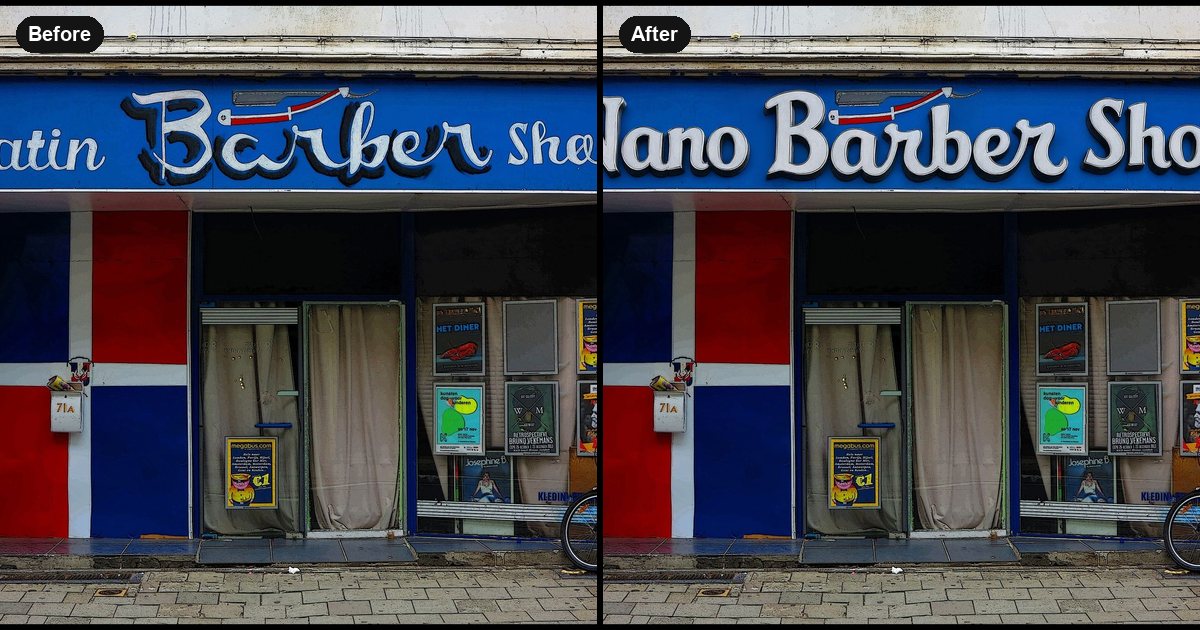
The photo is a blue barber shop front whose sign reads "Latin Barber Shop". We changed it to "Nano Barber Shop" and asked it to keep the same 3D letter style.
The sign came back reading "Nano Barber Shop" in the same white lettering with the same drop shadow, on the same blue panel, at the same perspective. The editor reported that 10.17% of the image changed and that the rest was identical. The door, the posters, the flag-coloured panels and the bicycle by the door were untouched.
One thing to look at: the original sign mixes two letter styles, a script for "Latin" and "Shop" and a heavier shadowed script for "Barber". The result re-draws all three words in one consistent style so they match the new text. If you need the original mix, say so in Extra details and compare the variations.
Tips
Cost and limits
50 credits ($0.50) per finished edit; refunded if it fails. It edits text in still photos. It is not a tool for forging documents, and you should only edit images you have the right to change.
Related guides
The storefront is "Barber Storefront with Flag - panoramio.jpg" from Wikimedia Commons, licensed CC BY-SA 3.0; the edited version is shared under the same licence.
Try it on your own photo
Nano ImageEdit 2.0 Online costs 50 credits ($0.50) per edit, and an edit that fails is refunded. New accounts get free credits.
Open Nano ImageEdit 2.0 Online